Snow Cap: Integrating Festive Color Typography into Creative Workflows
In the landscape of seasonal design, typography often serves as the primary vehicle for emotional connection. While standard serif and sans-serif typefaces provide structure, they frequently lack the immediate tactile warmth required for holiday-specific projects. Snow Cap addresses this gap by functioning not merely as a font, but as a pre-rendered illustration system. This color font transforms ordinary text strings into complex, multi-colored SVG glyphs that mimic the texture and charm of handmade holiday gifts. For designers, marketers, and content creators, understanding how to integrate Snow Cap into existing workflows is essential for maintaining efficiency while achieving a high-impact, festive aesthetic without the time investment of custom lettering.
Understanding Color Fonts in Modern Design Pipelines
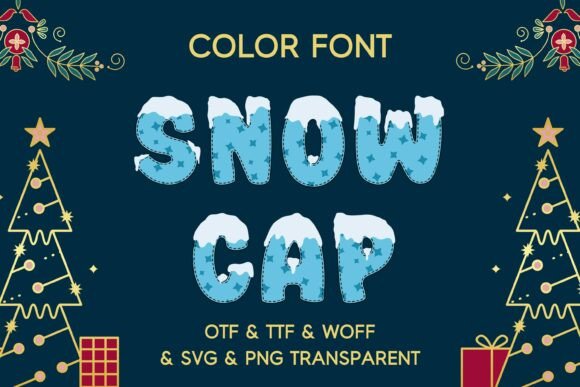
Before implementing Snow Cap, it is necessary to distinguish it from traditional OpenType fonts. Standard typefaces rely on single-color vector outlines that inherit color properties from CSS or design software settings. Snow Cap, conversely, utilizes the OpenType-SVG format. Each glyph contains embedded color and gradient data, meaning the "snow" texture and shading are intrinsic to the character itself. This distinction fundamentally alters the production pipeline.
In a practical workflow, this means you cannot simply change the font color via a swatch panel to match a brand guideline. Instead, Snow Cap acts as a fixed asset with its own defined palette. This requires a shift in planning; the typeface should be selected during the mood boarding or style guide phase rather than as an afterthought. Because the glyphs are richly detailed illustrations, they carry significant visual weight. Designers must account for this density when establishing hierarchy, ensuring that Snow Cap headlines do not compete with other intricate photographic elements or patterns in the layout.
Technical Compatibility and Software Integration
Successful deployment of Snow Cap depends heavily on software compatibility. The package includes OTF, TTF, WOFF, SVG, and PNG formats to cover various stages of production. For professional print and digital design workflows, the OTF (OpenType-SVG) version is the industry standard. It is fully supported in Adobe Illustrator CC 2018+, Photoshop CC 2017+, InDesign CC 2019+, and Affinity Designer. In these environments, the font remains editable text, allowing for rapid copy changes while retaining full color fidelity.
However, legacy software or specific web platforms may not render OpenType-SVG correctly. This is where the fallback assets become critical components of the workflow:
- SVG Files: Use these for web projects where browser support for color fonts is inconsistent. They remain scalable vectors but function as images rather than live text.
- PNG Files (500ppi): These high-resolution transparent rasters are ideal for video editing software, Canva, Cricut Design Space, or older versions of Adobe Creative Cloud. At 500ppi, they retain crisp edges even at large display sizes.
- TTF/WOFF: Essential for embedding in websites or apps, though developers must verify browser support tables before relying solely on the color font rendering.
For web developers, integrating Snow Cap requires testing across Chrome, Firefox, Safari, and Edge. While support is growing, a robust CSS fallback strategy using standard web-safe fonts ensures readability if the color glyphs fail to load.
Strategic Application Across Project Types
Snow Cap is most effective when applied strategically to specific touchpoints within a project lifecycle. Its whimsical, textured nature makes it unsuitable for body copy or dense informational text. Instead, it excels as a focal point element. Understanding where to deploy this asset prevents design fatigue and maintains professional polish.
Greeting Cards and Stationery Production
In stationery design, speed and consistency are paramount. Snow Cap streamlines the creation of greeting cards by eliminating the need to source separate clip art for headers. When designing a suite of holiday cards, use the font for the primary salutation or sentiment. Because the glyphs share a unified artistic style, using Snow Cap across multiple card designs creates instant collection cohesion. For print production, ensure your document is set to CMYK and check the color separation preview, as the embedded gradients in SVG fonts can sometimes behave unpredictably during RIP processing depending on the printer’s specifications.
Digital Marketing and Social Media Assets
For social media managers and digital marketers, the PNG variation of Snow Cap offers significant workflow advantages. Platforms like Instagram Stories, TikTok overlays, and Pinterest pins often restrict custom font uploads. By utilizing the 500ppi transparent PNGs, creators can drag and drop pre-styled typography directly onto mobile designs or video timelines. This maintains brand consistency across channels without requiring subscribers to third-party design apps. When creating animated content, treat the Snow Cap PNGs as static layers and apply motion graphics effects separately to preserve the integrity of the hand-drawn texture.
Merchandise and Product Packaging
When designing for physical products like gift tags, stickers, or apparel, resolution and scalability are non-negotiable. The OTF and SVG formats allow for infinite scaling without pixelation, which is vital for screen printing or laser cutting. For sticker design, the intricate edges of the snow-cap letters may require simplified cut lines. In Illustrator, use the Offset Path tool to create a clean contour around the color glyphs before sending files to die-cut machines. This prevents jagged edges and ensures the final product looks manufactured rather than homemade, despite the font’s artisanal aesthetic.
Workflow Optimization and Asset Management
Integrating a specialty typeface like Snow Cap requires organized asset management to prevent bottlenecks. Unlike system fonts that are always available, specialty color fonts and their associated image assets must be properly linked or installed.
Pre-Project Preparation
Before beginning a seasonal campaign, audit your team’s software versions. If collaborators are using older applications, distribute the PNG and SVG asset packs via a shared cloud drive. Create a designated folder structure labeled "Snow Cap Assets" containing subfolders for each format. This reduces friction during collaborative reviews and ensures that a designer opening a file on a different machine has access to the necessary fallback graphics. For agencies handling multiple client accounts, consider licensing compliance and organize files by project to avoid cross-contamination of assets.
Quality Control and Output Verification
Color fonts introduce unique quality control checkpoints. Always proof output on the intended medium. A vibrant gradient that looks excellent on an RGB monitor may appear muddy when converted to CMYK for newsprint. Similarly, test web implementations on mobile devices, as touch interfaces sometimes handle SVG fonts differently than desktop browsers. Establish a verification step in your production checklist specifically for color font rendering. This proactive approach prevents costly reprints or post-launch fixes.
Balancing Aesthetics with Functional Typography
While Snow Cap provides immediate festive appeal, successful design relies on balance. The typeface is inherently decorative and carries a high level of visual noise. To maintain readability and professional standards, pair it with clean, neutral typefaces. A simple geometric sans-serif or a classic humanist serif allows Snow Cap to shine without overwhelming the viewer.
Consider spacing and leading carefully. The vertical metrics of illustrated fonts often differ from standard typefaces. You may need to manually adjust tracking or baseline shifts to align Snow Cap headlines with adjacent text blocks. In children’s book titles or educational materials, ensure the stylized letterforms remain legible for early readers. While the charm is undeniable, clarity must never be sacrificed for decoration. Test readability at small sizes; if the snow texture becomes indistinguishable sludge at thumbnail scale, reserve the font for larger display applications only.
Long-Term Value and Versatility
Investing in a comprehensive typeface package like Snow Cap yields returns beyond a single holiday season. The inclusion of multiple formats future-proofs the asset against software obsolescence. As design tools evolve, having both the native OTF color font and the universal PNG/SVG backups ensures the asset remains usable regardless of platform shifts. Furthermore, the handcrafted aesthetic transcends specific yearly trends. Unlike novelty fonts tied to pop culture moments, the natural texture of snow and classic lettering forms offer longevity.
For freelancers and small business owners, this versatility translates to cost efficiency. A single license covers everything from high-end print brochures to quick-turnaround social media stories. By mastering the technical integration of Snow Cap—from installation and compatibility checks to strategic pairing and output verification—creators can elevate their seasonal work efficiently. The result is typography that feels bespoke and intentional, bringing genuine joy and texture to digital and physical spaces alike. Through thoughtful implementation, Snow Cap becomes more than a decorative add-on; it becomes a reliable tool in the professional creative arsenal.