Space Galaxy: A Practical Guide to Using Cosmic Dingbats Effectively
Embark on an interstellar journey with Space Galaxy, an out-of-this-world dingbats font that delivers an entire universe of meticulously crafted, golden-lined cosmic icons right to your fingertips. For designers, educators, and content creators, this typeface offers a unique shortcut to high-quality space-themed visuals. However, treating a symbol font exactly like standard text is one of the most common pitfalls new users face. Understanding the specific mechanics of Space Galaxy ensures you leverage its full potential without compromising your design workflow or final output quality.
Understanding the Nature of Symbol Fonts
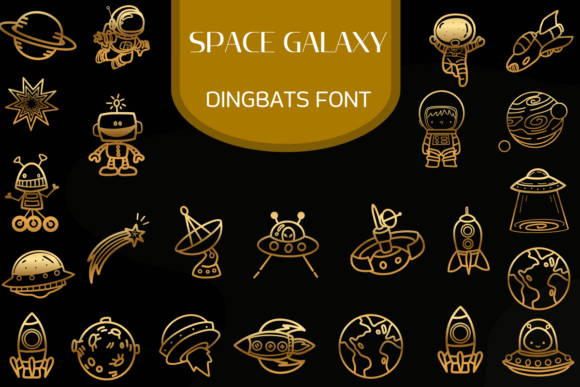
Before installing Space Galaxy, it is vital to recognize that this is not a typographic tool for sentences. It is a pictorial library mapped to keyboard characters. This incredible Space Galaxy font transforms simple keystrokes into stunning, intricate illustrations of astronauts, rockets, planets, aliens, and various celestial phenomena. The convenience lies in accessibility; you do not need to open separate vector files or search stock libraries. Yet, this convenience can lead to confusion if you attempt to use it for body copy or headlines.
A frequent mistake occurs when designers try to mix Space Galaxy with standard sans-serif or serif fonts within the same text box. Because dingbats rely on specific Unicode mappings or legacy character slots, switching fonts mid-sentence often results in empty boxes or nonsensical symbols. The better approach is to treat each icon as an independent object. Type the desired character in a dedicated text frame, then convert it to outlines or shapes immediately. This isolates the graphic from text formatting engines and prevents rendering errors when sharing files across different operating systems or software versions.
Navigating Color and Customization Limitations
Each of the included glyphs is designed with a sleek, modern aesthetic, featuring crisp outlines and a sophisticated golden hue. While this default styling provides immediate futuristic elegance, assuming the color is permanent limits creative flexibility. Many beginners overlook the fact that these are vector-based glyphs. They are fully editable paths, not raster images.
If you leave the icons as live text, changing the fill color might only affect the interior shape while leaving the stroke intact, or vice versa, depending on how the font was constructed. To avoid inconsistent branding, always expand the appearance of the glyph first. Once converted to vector paths, you gain complete control over stroke weight, gradient fills, and opacity. This step is crucial for adapting the golden-lined aesthetic to dark mode interfaces or pastel-colored children’s books without losing the integrity of the original artwork. The convenience of this Space Galaxy dingbats typeface allows for instant scalability and color customization within your design software, but only if you unlock the vector data properly.
Sizing, Spacing, and Visual Hierarchy
Dingbat fonts rarely adhere to standard typographic metrics. The bounding box of a rocket icon might be significantly taller than that of a planet, causing alignment issues when placed in a grid or alongside text. Relying on automatic leading or baseline shifts often produces uneven layouts that look unprofessional.
Instead of fighting the font's internal metrics, manually adjust the placement of each symbol. Use optical alignment rather than mathematical centering. When designing game interfaces or social media graphics, ensure there is adequate negative space around each element. Crowding these intricate illustrations reduces their impact and makes the golden details difficult to discern at smaller sizes. Whether you are designing for apparel, digital art, or print, the vector-like quality of the Space Galaxy font ensures impeccable results every time, provided you respect the visual weight of each individual glyph.
Licensing and Commercial Application Checks
Ideal for sci-fi themed branding, educational materials, children's space books, game interfaces, or unique social media graphics, this dingbats font provides endless creative possibilities. However, "endless" does not mean unrestricted. A critical oversight involves assuming that purchasing the font grants universal usage rights. Font licenses vary significantly between personal, commercial, and extended use cases.
Before integrating Space Galaxy into merchandise, app assets, or large-scale advertising campaigns, verify the specific license terms. Some licenses restrict the number of impressions, physical products sold, or require attribution. Failing to check this can lead to legal complications or unexpected costs later. Additionally, confirm whether the license covers web embedding if you plan to use the icons on a live website. Often, desktop licenses do not include webfont files. Securing the correct license upfront protects your project and supports the type designer’s continued work.
Optimizing for Different Media Formats
The versatility of Space Galaxy shines when applied correctly to specific mediums. However, using the same file setup for embroidery as you would for a website banner is a recipe for poor results. The intricate golden lines that look beautiful on screen may be too thin for thread or low-resolution printing.
- For Apparel and Embroidery: Simplify the vectors after expanding. Remove internal details that cannot be stitched and thicken the outer strokes to prevent thread breaks. Test the size physically before production.
- For Digital Interfaces: Export icons as SVGs rather than PNGs to maintain crispness on retina displays. Ensure the viewBox is trimmed tightly to the artwork to avoid excessive whitespace in UI components.
- For Print Materials: Verify that the gold effect translates well to CMYK or spot color printing. Screen gold often looks muddy in standard four-color process. Consider using a metallic ink or foil stamp for true luxury, utilizing the font’s outlines as the die-line.
Evaluating Fit Before Commitment
Explore the cosmos and elevate your designs with this stellar collection of space-themed symbols, but do so with intention. Not every project requires ornate, golden-lined imagery. Sometimes, a minimalist line icon serves the communication goal better. Before downloading or buying, assess whether the specific style of Space Galaxy aligns with your brand voice.
Create a mood board and test a few sample glyphs in context. Does the sophistication of the golden hue clash with a playful, matte-finish brand identity? Do the astronaut illustrations match the diversity and tone of your educational content? Making these evaluations early saves time and resources. Remember that while Space Galaxy is a powerful asset, it is a tool meant to enhance clarity and engagement, not merely to decorate. By avoiding common technical missteps and respecting licensing boundaries, you ensure that your interstellar design journey remains smooth, professional, and creatively rewarding.